Finding the Key: A New Concept Page and the Key Finder
"What key is this in?" is one of the first questions you hit when you start making music, and one of the last to get a straight answer. The new Keys concept page is our go at explaining it properly - and it comes with an interactive tool I'm rather fond of: the Key Finder.
What a key actually is
A key is a family of notes and chords that sound settled together, with one note - the tonic - that feels like home. There are twelve of them, one rooted on each note, and each can be major or minor. (In truth there are a few more flavours than that - the modes - but major and minor are the two you'll meet most often, so the rest can wait for another day.)
The useful thing is that a key is really a shape, not a fixed set of letters. The major scale is the same pattern of steps wherever you start it, so the same melody or chord progression can be played in any key - same feel, just higher or lower in pitch. (This is why a singer can ask you to "take it down a bit" without changing the song.)
A tool that works backwards
Most lessons go one way: pick a key, and here are its notes. The Key Finder goes the other way, which is closer to how your ear actually works. You click the notes you hear, one at a time, and it tells you which keys those notes could belong to.
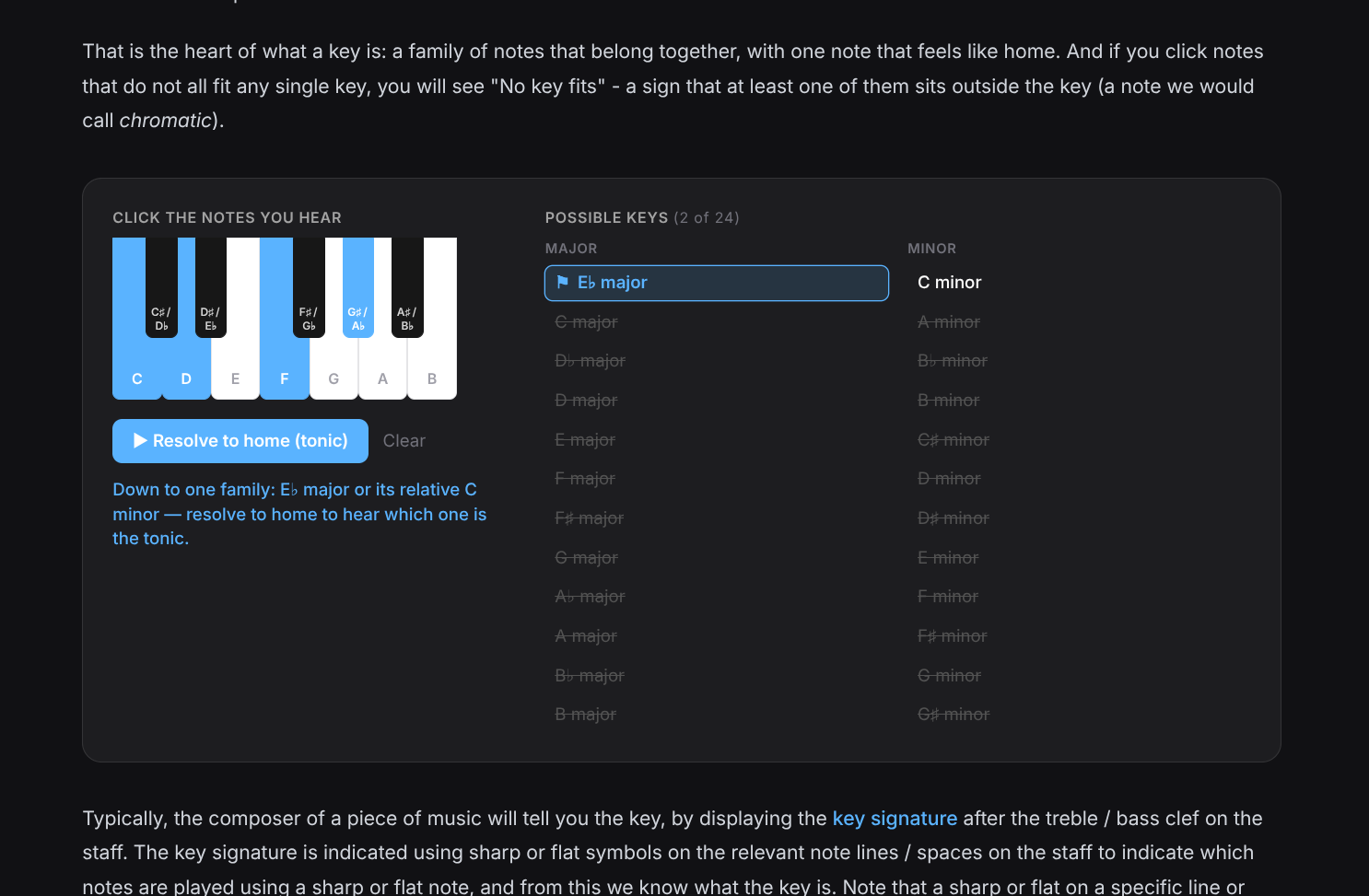
Start clicking, and the list of possible keys narrows. A key stays in the running only while it contains every note you've chosen, so the more you add, the fewer survive. Click a set of notes that don't all fit anywhere and you'll get "No key fits" - a sign that at least one of them sits outside the key.
Note that you can never get down to a single key from the notes alone. Every major key shares its exact seven notes with its relative minor - C major and A minor are the same notes - so the best the notes can do is narrow you to a pair. That's not a flaw in the tool. It's genuinely how music works, and it's the reason your ear needs more than a list of notes to decide where home is.
Resolving to home
So how do you settle it? You listen. The "Resolve to home" button plays a few notes that lean towards the tonic, pauses, then lands on home - and you hear which note the music has been pulling towards all along. Pick the major of the pair and it resolves one way; pick the minor and the same notes resolve somewhere else. That moment - the same notes pointing at two different homes - is the whole idea of a key in a couple of seconds.
You don't have to filter anything first, by the way. You can just pick any key from the list and hear it resolve, if you only want a feel for how it sounds.
Reading the key on the page
The page also covers the practical side: how a composer tells you the key up front with a key signature, the sharps or flats sitting just after the clef. There are a few example staves - C, G, D, F and B♭ - so you can see how the signature grows as you move around the keys, and a closing section on why you'd choose one key over another in the first place (vocal range, what's easy to play, and the lift you get from changing key mid-song).
Try it
- Open the Keys page.
- Click a few notes on the little keyboard and watch the possible keys narrow.
- When you're down to a pair, press "Resolve to home" and listen for the tonic.
- Try the major, then the minor, and hear the same notes resolve to different homes.
It's a small tool, but I think it makes a slippery idea click in a way that words on their own never quite manage. As always, there's more on the way, and updates will be posted here as they land.